How Much Space Do You Need for a Golf Simulator?
· Updated · 15 min read
Before a single bay gets booked, an operator has to answer the question that shapes everything that follows: how much space do you need for a golf simulator? It looks like a measuring problem. It is closer to a business problem. The golf simulator room dimensions you commit to on the day you sign a lease set the number of bays you can run, the kind of customer you can serve, and the ceiling on what the location can ever earn.
This guide is written for that decision. Not for a hobbyist fitting a home golf simulator into a spare room, but for the person planning a commercial indoor golf venue and trying to confirm whether a given building actually works before money changes hands. Get the room dimensions right and the rest of the build has a foundation. Get them wrong and no amount of good software, pricing, or marketing fully recovers the lost capacity.
How Much Space Do You Need for a Golf Simulator?
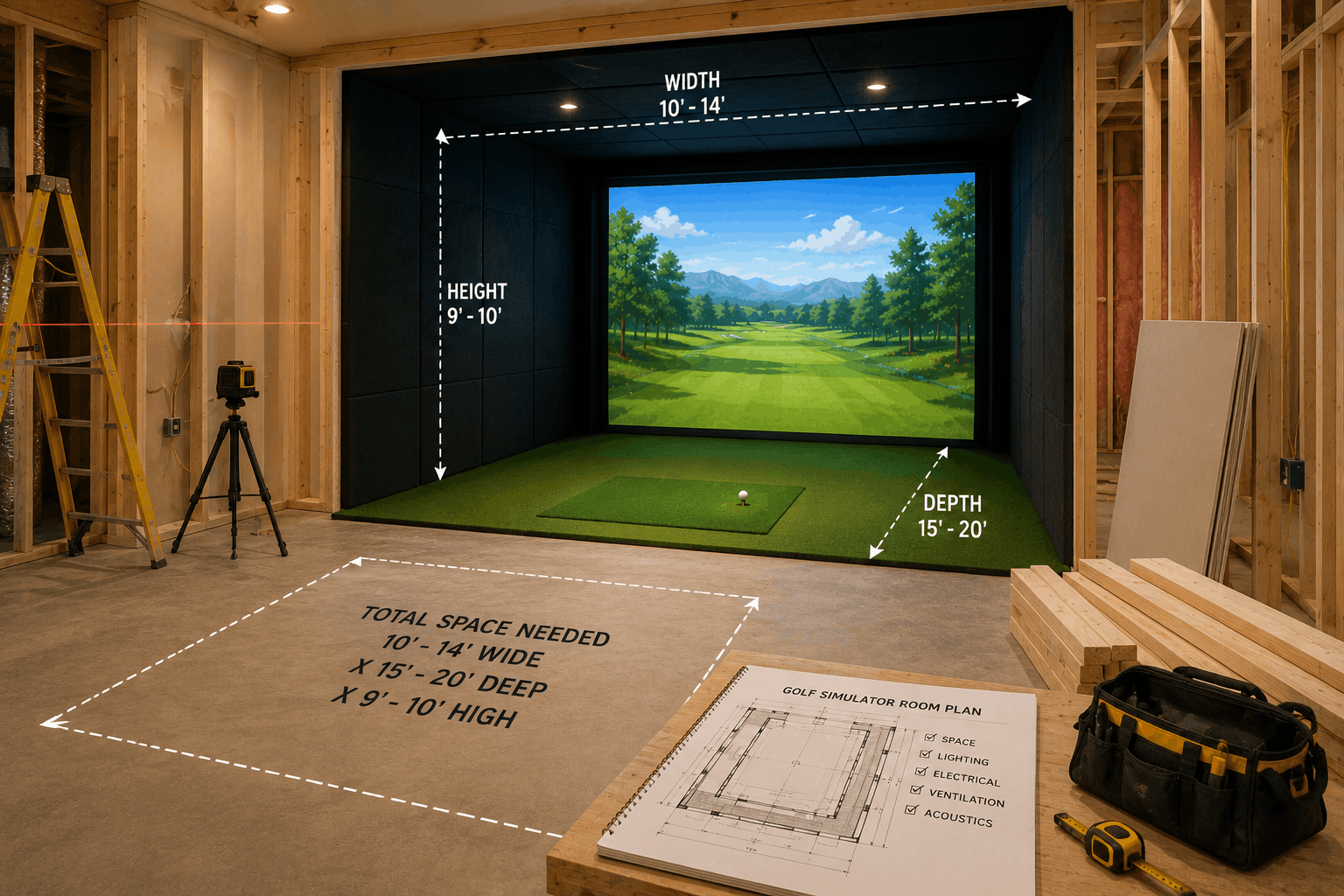
For a single commercial bay, plan for roughly 15 feet of room width, 10 feet of ceiling height, and 18 to 20 feet of room depth. That is the recommended golf simulator room size Trackman publishes for a comfortable setup, and it is the room size a venue should design around rather than the floor. A golf simulator room built to those golf simulator room dimensions gives almost any golfer enough room to swing, which is exactly what a paying floor needs.

The absolute minimums are smaller. Trackman's room dimension guidance lists a single-bay minimum of about 10 feet of width and about 16 feet 5 inches of depth, with the golf ball sitting about 8 feet 2 inches from the impact screen. Camera-based units can often work in shallower rooms than radar units, so always check the manufacturer's spec for the exact unit you plan to buy. Those numbers prove a golf simulator room can be squeezed into a small space. They do not prove it should be, and for a commercial floor that distinction is the whole game. The right golf simulator setup for a venue treats those figures as a starting point and plans real golf simulator space requirements around peak use, not minimum use.
Build to the Recommended Numbers, Not the Minimum
A hobbyist can build a home golf simulator to a minimum because they are building for one body and one golf swing. They know their height, their tempo, and which hand they play from. They can plan a golf room around themselves and live with it.
An operator has none of that control. You do not get to choose who books the bay. Over a single weekend a venue might serve a six-foot-four scratch player taking full driver swings, a junior on practice swings during a lesson, a left-handed golfer, and a group of first-timers who have never held a golf club. Every one of them pays the same hourly rate and expects a clean, safe golf game. Design the bay around the minimum and you design it around the smallest, most cautious swing in the building. The minimum is a home compromise. For a commercial venue, the recommended golf simulator dimensions are the real target, because the bay has to fit the widest range of indoor golfers who might walk through the door.
That single shift in mindset is the most important principle in this guide. Everything below is an application of it.
Ceiling Height: Measure Your Lowest Obstruction, Not Your Highest Point
Ceiling height is the constraint that quietly kills more candidate buildings than any other, and it is the one operators most often measure wrong. They look up, see an open ceiling, and assume they have the height. What matters is not the highest point of the structure. It is the lowest thing hanging into the swing path.
Commercial buildings are full of those things: HVAC ducts, sprinkler mains, structural beams, conduit, light fixtures, and drop-ceiling grids. A space with a 14-foot deck height can easily have a sprinkler line at 10 feet 2 inches running directly over the hitting position. The usable ceiling height for your bay line is set by that line, not by the deck. Walk every prospective golf simulator room with a laser measure and record the lowest obstruction across the entire run where bays will sit, not just at the center of one bay.
Trackman recommends 10 feet or more of clearance for comfortable full driver swings, and most adult golfers want every inch of it. An 8-foot ceiling restricts full swings with longer clubs, so a building stuck near that height is a hard problem, not a minor compromise. The reliable way to confirm a given space is to test it: have your tallest staffer stand in the hitting position and take upright swings with the longest club in the bag, because testing your swing with your longest club is what actually exposes whether the ceiling height works. Taller players feel a low ceiling first, and they will shorten their motion to protect the lights, which ruins both the swing and the data.
There is one exception to the 10 foot standard. Ceiling-mounted launch monitors built for tight rooms, such as the Trackman iO, can work at around 9 feet 4 inches because the unit lives overhead instead of behind the player. That is a legitimate path for a low-ceiling building, but it is a deliberate launch monitor decision you make early, not a patch you apply after the lease is signed.
Width: Every Bay Has to Play Both-Handed
In a home golf simulator, room width is a personal choice. In a commercial venue, it is not optional, because you will host right-handed and left-handed golfers in the same bay, often on the same day, and you cannot rebuild the golf simulator room between bookings.
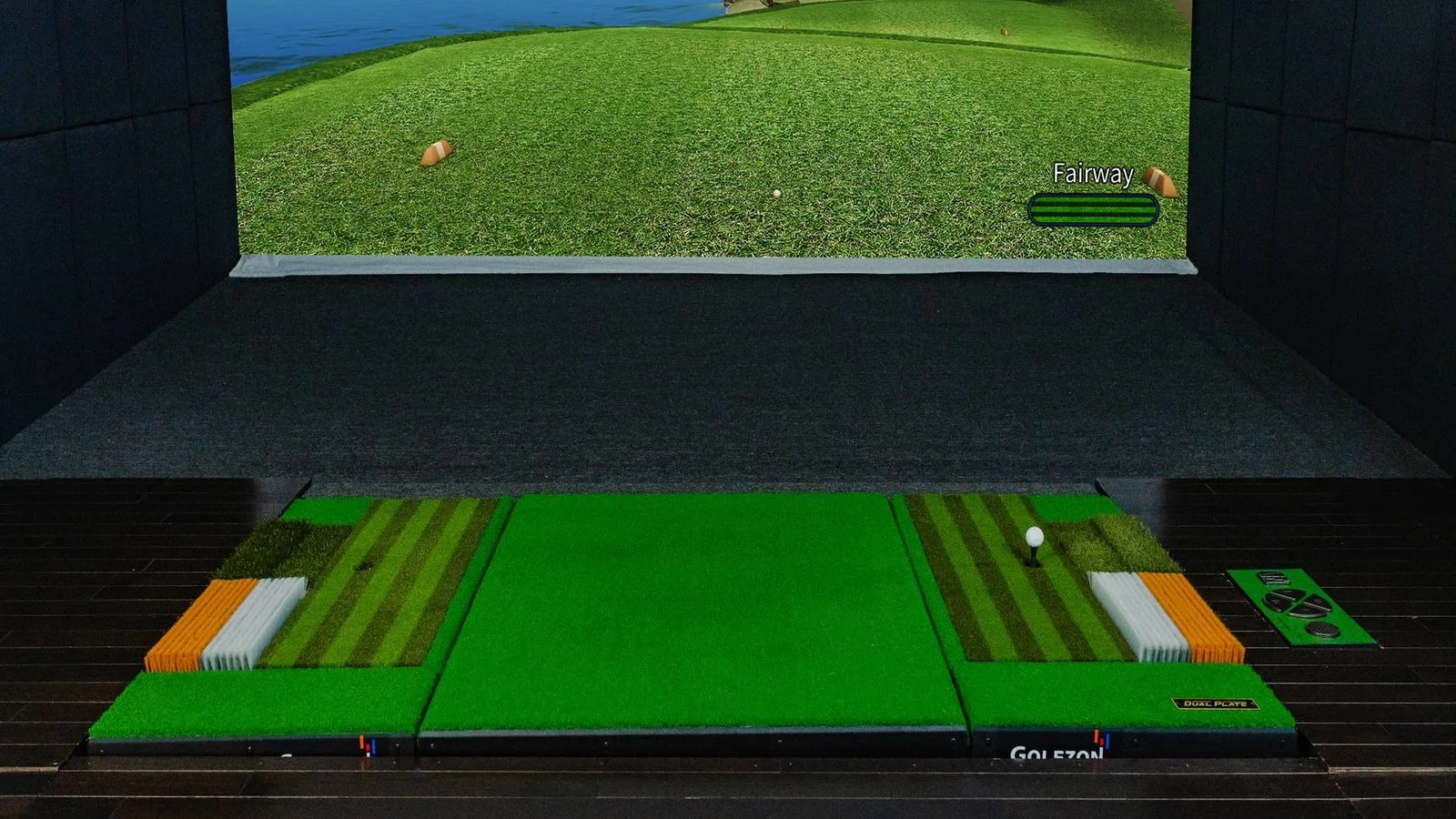
A width of 12 to 16 feet is ideal for comfort, and Trackman points to 15 feet as the benchmark for a single bay that needs to accommodate both-handed play and comfortable movement around the hitting area. A centered layout, where the golfer hits from the middle of the bay rather than off to one side, requires at least 14 to 15 feet in width to work for both dexterities. Anything tighter forces a minimum width compromise that pushes left-handed golfers off-center. Narrow rooms make golfers shift their stance and shorten their motion to avoid the wall, which degrades both the experience and the shot data. A player who cannot comfortably swing does not come back. For a venue charging by the hour, room width that supports a natural golf swing from either side is a revenue feature, not a luxury. Give left-handed golfers enough space to set up the way right-handed ones do, and the indoor golf simulator earns repeat visits. Skimp on golf simulator space and you quietly lose half your potential players.
Room width also carries a safety job that does not exist in a single-bay setup. On a multi-bay floor, two golfers may be mid-swing at the same moment in adjacent bays. The swing space between hitting zones is not just one player's follow-through room, it is the separation that keeps a golf club or a mishit golf ball in one bay from reaching a person in the next. Plan side buffers and divider netting into the swing area budget for every bay, not only the end bays. Even a foot or two of extra clearance on each side, at least a foot beyond the swing arc, changes how safe a busy floor feels.
Depth: Protect Ball Flight, the Data, and the Screen
Room depth is where the launch monitor decides the room. Trackman recommends 18 feet or more of total depth for a standard bay and keeps the golf ball at least about 8 feet 2 inches off the impact screen so the shot has room to launch, fly, and be captured cleanly. Give the ball enough room and the ball flight reads true; starve the room depth and the impact screen takes a beating from short, hot shots.
The type of launch monitor you choose sets the floor here. Camera-based and photometric units can work in a shallower simulator room because they read the ball at impact. Radar-based units need more runway behind the ball to track ball flight, which pushes total room depth toward the upper end of the range. This is why depth and launch monitor placement have to be planned together. Choosing a radar unit and then trying to fit it into a 16-foot simulator room produces inaccurate data and an impact screen that wears out fast. Decide the launch monitor and the room depth as one decision, before the build is locked. Our guide to the best golf simulator for business compares the systems venues choose most and the rooms each one needs.
Room depth also has to leave honest room behind the ball and behind the player. The standard breakdown is a few inches behind the impact screen for flex, about 8 to 10 feet from the screen to the ball (8 feet 2 inches is the minimum, and commercial bays usually give more), and clear stance and backswing space behind the golf ball, with radar setups adding several more feet of clearance behind the golfer. A bay that hits its depth number on paper but borrows the space from the walkway behind it is not actually deep enough. A golf simulator is more than just a screen and a hitting mat. The hitting mat sets the stance, the impact screen catches the shot, the launch monitor reads it, and the room depth behind the golf ball is what makes the ball flight data trustworthy. Skimp on the room size here and every part of that chain suffers.
Sizing the screen is a separate calculation from sizing the room, and operators routinely run it backwards. The impact screen has to fit the enclosure, the enclosure has to fit the bay, and the projector throw has to clear both. Work it in that order and the numbers resolve. Work it from the screen you want and you end up rebuilding the bay around a purchase.
Carl's Place publishes a free screen size calculator that runs the problem from room dimensions outward, which is a faster check than sketching it by hand. It is built for single-room builds, so treat the output as a per-bay spec and repeat it across the bay line rather than applying it to the room as a whole.
How a Commercial Build Differs From a Home Golf Simulator
Most golf simulator setup advice online is written for a home golf simulator: a single enthusiast converting garage space, a basement, or a spare room into a personal golf room. That guidance is not wrong, but it solves a different problem. A home golf simulator installation can lean on a small space because one person tunes the golf simulator setup to their own swing. A small simulator space that frustrates a stranger is fine when the only user is the owner, and a tight golf room that only ever sees one golf game a week never reveals its limits.
A commercial venue inverts every one of those assumptions. There is no single owner-swing to design around, a converted garage and spare-room shortcuts do not scale to paying traffic, and the golf simulator room dimensions have to hold up under constant, varied use. When you read consumer guides on golf indoors, treat their minimums as the absolute floor and plan your own golf simulator space requirements a full tier above them. The same goes for any home golf simulator gear list: a commercial golf simulator setup needs more room, sturdier components, a larger swing area, and a hitting mat rated for volume, not a single owner. An indoor golf simulator built for the public is a different machine from a home one even when the launch monitor is identical, and the people who play golf indoors at a venue expect a swing area that never makes them hold back. For the equipment side of the build, see our indoor golf simulator setup guide.
Pressure-Test the Space Before You Sign
Before committing to a building, walk it like a golfer, not a tenant. Stand in the likely hitting spot of each bay and ask how much room the swing actually has. Take a few practice swings with a driver to feel whether there is enough space overhead and enough room on both sides. Measure the simulator room at the points that matter: ceiling height at the lowest obstruction, room width for a centered stance, and room depth from the impact screen back through the hitting area. Picture where the launch monitor sits and whether the ball flight has a clear path to the screen. Confirm the golf simulator room size works for left-handed golfers, not only right-handed ones, and that taller players can swing comfortably with a full driver. If the space passes those checks, the golf simulator room dimensions are real rather than theoretical. If it fails even one, the ideal golf simulator dimensions on paper will not rescue the build.
From One Bay to a Floor Plan: The Multi-Bay Math
Once a single bay is sized correctly, a venue is mostly repetition. Trackman's own guidance for multi-bay builds is to take the single-bay footprint and multiply, then account for the space between bays. That is the right instinct, with two adjustments operators routinely miss.
First, bays do not sit flush against each other. Each one needs its own room width plus the shared buffer and divider described above, so the real width per bay, the pitch from one tee line to the next, is wider than the bay alone. Second, a row of bays is not a venue. People have to move behind the hitting zones without crossing into a live swing, which means a protected circulation lane along the back of the bay line that belongs to no single bay but eats real square footage.
A useful planning figure: a standard commercial bay with its buffer consumes somewhere around 280 to 320 square feet of pure playing footprint, before any shared space. That number, more than any wall-to-wall measurement, is what tells you how many bays a building can hold. Lay out each simulator room on the same template so the golf simulator room dimensions stay consistent bay to bay, and let the room layout, not guesswork, set the count. A uniform club length allowance and identical launch monitor placement in every bay keep the room size predictable across the floor. Running those bays at high utilization once they are built is a separate discipline, and it is where scheduling does the work a floor plan cannot, turning a fixed number of bays into a full schedule.
The Space You Do Not Swing In
The mistake that turns a promising lease into a tight one is counting only the bays. A working venue needs space that never holds a golf swing: a check-in and waiver area, a lounge or seating zone for groups and people waiting on a bay, restrooms, storage for rentals and supplies, and back-of-house for staff. If you are serving food and drink, that footprint grows again.
Booking patterns make the case for that space. In Sports Carnival golf simulator booking data from October 2025 to September 2026, about 36% of bookings run two hours and about 17% run longer. Friday through Sunday carries 53% of bookings, and on Monday through Thursday, 47% start between 4 pm and 8 pm. That means groups who stay a while, arrive together after work and on weekends, and overlap with the next group checking in. Plan seating next to each bay and room to move between bays, not only the hitting area.
Plan the ratio before you sign, not after. As a rough commercial rule, expect non-bay space to claim somewhere between a quarter and 40 percent of the gross floor area once circulation, seating, and back-of-house are all in. In practical terms, a 2,000-square-foot space that looks like it should hold six or seven bays usually lands at four or five once the room people actually move and wait in is accounted for. A larger space behaves the same way: the bays are the headline, and the rest is the building that makes the bays usable.
Accessibility belongs in this layer too. A commercial venue open to the public has to provide an accessible route and accessible facilities, and those requirements shape door widths, turning radius, and the path to and around the bays. It is far cheaper to plan the room layout for it now than to retrofit it later.
Your Floor Plan Sets Your Revenue Ceiling
Here is the reason all of this matters more for an operator than for a hobbyist. Bay count is effectively fixed the day you sign the lease. You cannot add a seventh bay to a six-bay room without construction, and often you cannot add it at all. The space decision is a one-time, high-stakes bet that caps how much the location can ever produce, because total capacity is simply bays multiplied by operating hours multiplied by how many sessions you can turn in each one.
That ceiling is set by the room layout. How close you get to it is set by operations. A venue with five well-sized bays and a booking system that keeps them full will out-earn a venue with seven cramped bays that sit half-empty because the experience is poor and the schedule is run by hand. Once the golf simulator room dimensions are right, the job becomes filling them, which is where real-time availability, automated deposits, and multi-bay scheduling through dedicated golf simulator booking software convert a good floor plan into actual revenue.
This guide deliberately stays on the space question. The money side of the build, what a venue costs to open and equip, is covered in our breakdown of golf simulator costs, and the wider operating picture is in our guide to starting a profitable golf simulator business. Space is the part you settle first, because it is the part you cannot change later.
Golf Simulator Room Dimensions for Venues: A Planning Reference
| Bay Element | Minimum Viable Bay | Standard Commercial Bay | Premium VIP Bay |
|---|---|---|---|
| Ceiling height | 10 ft (about 9 ft 4 in only with a ceiling-mounted unit) | 10 ft | 11 to 12 ft+ |
| Room width (per-bay pitch) | About 10 ft | 15 ft | 16 to 20 ft |
| Room depth | About 16 ft 5 in | 18 to 20 ft | 20 to 25 ft |
| Launch monitor fit | Camera or ceiling-mounted only | Most camera and radar units | Any unit, full clearance |
| Both-handed play | Tight | Comfortable | Effortless |
| Best use | Space-constrained buildings | General customer play | Groups, events, memberships |
Treat the standard column as your default golf simulator room size. Drop to the minimum column only when a building forces it, and make the launch monitor choice the smaller footprint requires. Reach for the premium column where the space allows, because wider, taller bays are what you sell as a higher-priced experience. Whichever column you choose, confirm the golf simulator room size leaves enough space for a full swing and enough room to walk behind the bay. A premium simulator room gives more swing area, a bigger hitting mat, and a larger impact screen, while a minimum bay trims the swing area to the smallest workable golf simulator room. When you compare buildings, ask how much room each one really offers once the launch monitor and impact screen are placed.
Conclusion
How much space you need for a golf simulator is really a question about how much business you can build in a given building. A single bay sized to the recommended golf simulator dimensions, roughly 15 feet wide, 10 feet tall, and 18 to 20 feet deep, gives every golfer a real swing. A floor plan that repeats that bay correctly, with buffers, circulation, and back-of-house honestly accounted for, sets a capacity you can be proud to fill.
Settle the space first. It is the one decision the rest of the build depends on, and the one you cannot easily undo. When the golf simulator room dimensions are right and it is time to keep those bays booked, the right scheduling system handles the bookings, payments, memberships, and bay calendars that turn a well-planned room into a venue that runs at capacity. Book a demo to see it on your own floor plan.
Frequently asked questions
How big does a room need to be for a golf simulator?
For a single commercial bay, plan for about 15 feet of room width, 10 feet of ceiling height, and 18 to 20 feet of room depth. A golf simulator room can fit into smaller minimums, around 10 feet wide by 16 feet 5 inches deep, but venues should design to the recommended size so the bay works for any golfer who books it, with enough room for a full swing, a hitting mat, seating, and a clean walk-around.
What is the minimum ceiling height for a commercial golf simulator bay?
Around 10 feet is the practical standard for comfortable full driver swings. The exception is a ceiling-mounted launch monitor such as the Trackman iO, which can work at roughly 9 feet 4 inches. An 8-foot ceiling restricts full swings with longer clubs, so measure to the lowest obstruction over the bay line, such as ducts or sprinkler lines, rather than the highest point.
How many golf simulator bays can fit in 2,000 square feet?
Usually four to five, once you account for the swing space between bays, a circulation lane behind the hitting area, and back-of-house like check-in, seating, and restrooms. A standard bay with its buffer consumes roughly 280 to 320 square feet of playing footprint before any shared space is added.
How much space do you need between golf simulator bays?
Enough for two golfers to swing at the same time in adjacent bays, plus divider netting between hitting zones. Leave a foot or more beyond each swing arc on both sides as a safety buffer. That separation is part of each bay's width budget and protects golfers in neighboring bays from a stray club or ball.
Continue Reading
Articles you might be interested in